About the game
Simple to learn. Hard to master.
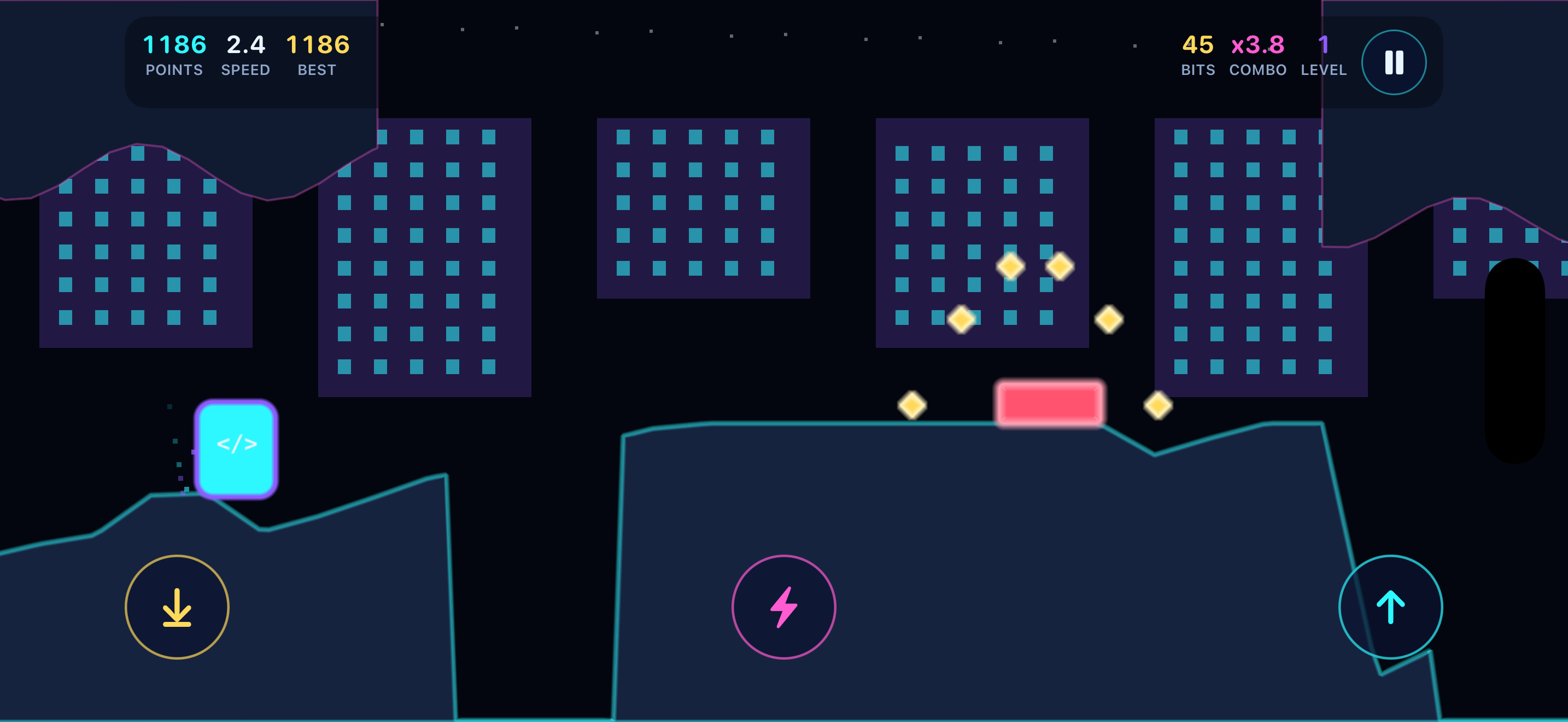
The Runner auto‑scrolls across a living motherboard at an ever‑increasing pace while you time jumps, ducks and dashes to survive. Collect bits, chain your actions into a combo multiplier, grab power‑ups, push through progressively harder terrain, and survive the Mainframe boss fight — then compare your best runs on the leaderboard.
🎧 An original soundtrack
A custom score written for the game by H3 Consulting Partners LLC drives every run.
🏆 Leaderboards worth chasing
Game Center boards for Overall, Daily and each run modifier — plus achievements for every skin you unlock.
🎮 Play your way
Touch gestures, on‑screen buttons, or an Xbox, PlayStation or MFi controller — no setup required.
🔒 Privacy‑first
No accounts, no developer‑run tracking servers, no gameplay data sent anywhere. Play offline start to finish.
The goal
Run as far as you can. The track never ends.
It only gets faster and more crowded. Every obstacle you clear, every bit you grab and every combo you keep alive adds to your score. One wrong move — or one too many, depending on your modifier — ends the run. The real game is seeing how long you can keep the flow going.
Core moves
- Jump — clear low hazards and gaps. Tap the screen or press A.
- Double jump — tap again while airborne for extra height or a last‑second correction. Disabled in the Hardcore modifier.
- Duck — hold to slide under high obstacles and incoming fire.
- Dash — a quick burst that powers you through or past certain threats and helps you reposition. Use it deliberately; timing matters.
Controls
| Action | Touch | Game controller |
|---|---|---|
| Jump / double jump | Tap the screen | A · D‑pad Up · Left Stick Up |
| Duck (hold) | Swipe down and hold | B · D‑pad Down · Left Stick Down · L1 · L2 |
| Dash | Swipe right | X · R1 · R2 |
| Pause / resume | On‑screen Pause button | Menu · Options |
| Restart while paused | On‑screen button | Y |
| Leaderboard | On‑screen button | Y |
Controllers just work
Pair an Xbox Wireless, PlayStation DualShock 4 / DualSense, Backbone, Razer Kishi or any other MFi controller in the iOS Settings app and the game picks it up — there is nothing to configure. Buttons above are named Xbox‑style; on a PlayStation pad A is ✕, B is ○, X is □ and Y is △. The on‑screen buttons step aside while a controller is connected, and if the controller disconnects mid‑run the game pauses instead of running on without you.
Active runs lock to landscape so every player gets the same play area and the leaderboard stays fair. Start a run in portrait and a “Rotate Device to Continue” prompt pauses play until you turn it. Menus work in any orientation.
Bits & combos
Staying in the flow is where the big scores come from
Bits are the glowing collectibles scattered along the track — they feed both your score and your multiplier. Combos build as you chain actions and collect bits without missing, climbing all the way to 8× on everything you score. Let the combo timer (about three seconds) lapse without acting and the multiplier resets to one.
Power-ups
| Power‑up | Effect | Duration |
|---|---|---|
| 🛡 Shield | Absorbs a single hit that would otherwise end your run | Until used |
| ⚡ Overclock | Doubles your score (2×) while active | ~5 sec |
| 🧲 Magnet | Pulls nearby bits toward you so you collect them automatically | ~7 sec |
| 🌀 Slow‑Mo | Slows the game down so you can thread tight sections | ~4 sec |
Run modifiers
Before a run you can pick a modifier that changes the rules — and your score multiplier. More risk, more reward, and each one has its own leaderboard.
| Modifier | What changes | Score |
|---|---|---|
| No Modifier | Standard mode. Double jump and shields enabled. Start with one shield. | 1.0× |
| Bit Rush | Twice the bits — but no shields. | 1.2× |
| Feather Fall | Lower gravity, floatier jumps. Start with one shield. | 1.25× |
| Hardcore | No double jump. | 1.5× |
| Glass Cannon | No shields — one hit ends the run. | 1.75× |
The Mainframe boss
Push far enough and the run culminates in a Mainframe boss fight — a higher‑intensity encounter that tests everything you’ve learned about jumping, ducking, dashing and power‑up timing. Defeating bosses also counts toward unlocking the Bossbane skin.
Progression
Scoring, skins and the daily seed
How you score
Distance and speed, bits collected multiplied by your live combo, up to 8× from the combo chain, 2× more while Overclock is active, and up to 1.75× on the final total from your chosen modifier.
Skins are cosmetic, always
Every skin re‑colors the Runner but uses the exact same hitbox, so nothing you unlock ever changes the difficulty — for you or for anyone you’re competing with.
Daily Seed
Every player gets the same course each day. The seed comes from the UTC date and runs through a deterministic generator, so the track is identical for everyone on the same app version — no server required.
Leaderboards
A Game Center board per category: Overall, Daily, Hardcore, Bit Rush, Feather Fall and Glass Cannon. Sign‑in is automatic, optional, and degrades gracefully — your local bests are always saved.
Unlockable skins
| Skin | How to unlock | Roughly |
|---|---|---|
| Pulse | Default starter skin | — |
| Sunset | 25,000 m lifetime distance | Week 1 |
| Matrix | 75,000 m lifetime distance | Week 2 |
| Bit Lord | 1,500 lifetime bits | Week 3 |
| Plasma | 175,000 m lifetime distance | Week 4–5 |
| Bossbane | Defeat 20 bosses | Week 5–6 |
Unlocks are driven by lifetime stats and tuned to reveal gradually over several weeks of regular play. Each one also awards a matching Game Center achievement.
Tips
How to actually climb the board
Protect your combo
A high multiplier is worth more than any single risky bit. Keep acting before the timer runs out.
Save your dash
It’s a tool for clutch moments, not a button to mash.
Time your Overclock
Trigger it heading into a dense, bit‑heavy stretch to get the most out of the 2× window.
Hold a shield in reserve
In standard mode you start with one. Don’t burn it early.
Match the modifier to the goal
Chasing the top of the board? Hardcore and Glass Cannon pay the most — if you can survive them.
Learn the Daily Seed
The course repeats for everyone that day, so practice runs translate directly into a better score.
Pricing
Free to play, with one optional purchase
The game is free to download and free to play, on a lives model: you start with a full pool of ten lives, each run costs one, and one life regenerates every fifteen minutes up to the maximum. Lives accrue on the wall clock, so they keep coming back while the app is closed.
- Unlimited Lives Forever — a single one‑time, non‑consumable in‑app purchase that removes the lives limit entirely, so runs never cost a life.
- It does not auto‑renew. There is no subscription in Tech Flow Runner. Payment is charged to your Apple Account at confirmation of purchase.
- Restore Purchases is available in the store screen and in Settings, and your purchase resolves even offline once made.
- Everything else is included. Skins, modifiers, Daily Seed, the boss fight and leaderboards are all part of the free game — nothing is sold behind a paywall.
Accessibility
Playable for as many people as possible
- On‑screen control buttons for Jump, Duck, Dash and Pause as a full alternative to gestures.
- External controller support — Xbox, PlayStation and MFi — for players who find physical buttons easier than touch.
- Reduced‑motion support that honors your system “Reduce Motion” setting.
- Pause anytime, plus automatic pause when the app is backgrounded or a controller disconnects.
- Clear status messaging and screen‑reader announcements throughout the menus.
- A mute toggle that remembers your choice between sessions.
Privacy
No accounts. No tracking servers. No data to lose.
Tech Flow Runner is designed to minimize data collection. H3 Consulting Partners LLC does not operate custom back‑end servers for the game, does not require user accounts, and does not transmit gameplay information to developer‑controlled systems.
No sign-up
There are no accounts in the game at all. Install it and play.
Progress stays local
Settings, lifetime stats, unlocks and best scores are stored on your device.
Game Center is optional
Leaderboards and achievements are handled entirely by Apple, under Apple’s privacy terms. Not signed in? The game still works and still saves your bests.
Fully offline
Every mode is playable with no connection whatsoever — including the Daily Seed.
The complete policy, including exactly what Apple handles on our behalf, is in the Tech Flow Runner Privacy Policy.
FAQ
Common questions
Do I need an account or an internet connection to play?
No to both. There are no accounts in the game, and it is fully playable offline — including Daily Seed, which derives its course from the date rather than a server.
Is Game Center required?
No. Game Center is optional and only powers leaderboards and achievements. If you’re not signed in, the game still saves your local best scores.
My score didn’t appear on the leaderboard.
Make sure you’re signed in to Game Center in iOS Settings, and that you have a connection when the run ends. Your local bests are saved either way.
Do skins make the game easier?
No. Skins are purely cosmetic — every one uses the exact same hitbox as the default Runner, so the difficulty and the leaderboard stay fair.
The game looks different when I rotate my phone.
That’s expected. Active runs lock to landscape so everyone shares the same play area; menus work in any orientation.
My combo keeps resetting.
Your combo lapses if you go about three seconds without collecting bits or acting. Keep the chain alive by staying active.
Is the web version still available?
Development is now focused entirely on the native iOS app. An earlier web/PWA version exists but has been archived and is no longer maintained or developed — all new features and fixes ship to the iOS game.
I found a bug or have a feature request.
We’d genuinely like to hear it — email us at [email protected]. For security issues, please contact us privately rather than posting publicly.
Get Tech Flow Runner
Free to download and free to play — no account, no ads and no tracking, with one optional in‑app purchase if you want it. Play a full run offline the moment it installs.

Requires iPhone or iPad on iOS 17 or later.
Support & contact
Have a question, found a bug, or want to share feedback? We’re happy to help.
[email protected]